
M365 Copilot (Premium)
M365 Copilot (Premium) is an AI-powered productivity tool. It saves users time on routine tasks such as managing emails, drafting documents, creating presentations, following up on meetings, and analyzing data. Unlike Copilot Chat (Basic), Premium works directly within Microsoft 365 apps and organizational content, based on the user’s access permissions.
Copilot Chat (Basic) vs Copilot (Premium):
| Copilot Chat (Basic) | Copilot (Premium) | |
| Cost | No charge.
Eligible for CUHK staff, students, and project accounts using your M365 account. |
A yearly subscription fee applies.
Subscribe license “M365 Copilot Education | Item# AAU-89322” through this Application form. (M365 CUHK account login required). NOTES: Eligible staff will receive a free license without making a purchase. To check your eligibility, visit https://ai-hub.cuhk.edu.hk/access |
| Eligible Users | Any Microsoft 365 accounts on the Staff or Student tenant |
Staff tenant accounts with a subscribed license |
| Profile icon on the Copilot App |
 |
 |
| Your data is protected by EDP and will not be used to train AI model
EDP = Enterprise Data Protection. |
✅ | ✅ |
| Data Source | Public web information only | Public web information + your Microsoft 365 work data |
| Access to my files stored in M365 environment and desktop | Only if you share explicitly in Copilot Chat on web. | Yes. If you have a permission to access the files, it can access. |
| Available in Outlook app | Help you draft a email only. | Analyse and summarize your emails, calendar, meetings and other M365 content that you have permission to access. |
| Integrated into M365 apps (Word, Excel, PowerPoint,etc.) | ❌ | ✅ |
| Access to Files (OneDrive/SharePoint) |
❌ | ✅ |
To further understand the difference between Copilot Chat (Basic) and Copilot (Premium), please read this FAQs article.
Available to
All Staff, Project Accounts and Departmental Accounts
Service Charge and Application
Charged; application required
Access to Service
CUHK Microsoft 365 Portal: http://www.cuhk.edu.hk/o365
Service Availability
7 X 24; except maintenance period
Copilot supports Microsoft Edge (recommended) and other major non-Microsoft browsers like Chrome, Firefox, and Safari.
Once M365 Copilot (Premium) is enabled in your account, you will soon notice related features begin available on Microsoft Office 365 on the web. For example:
On the web (https://www.cuhk.edu.hk/m365): “M365 Copilot (Premium)” is displayed under your name.

Word / Excel / PowerPoint for the web:
1. The M365 Copilot (Premium) button will appear as a bobble at the bottom right corner.

2. The M365 Copilot (Premium) bobble no longer appears after selecting content in Word and PowerPoint, but can still right-click and use the “Edit with Copilot” option from the menu.

Outlook for the web – Copilot button will appear when composing email.

Microsoft Teams – Copilot button will appear in chats.

Word/Powerpoint/Excel – The M365 Copilot (Premium) button will appear as a bobble at the bottom right corner.

Outlook – Summarize button (Classic Outlook*) / Summary by Copilot button (New Outlook) will appear on message reading pane.


While you are waiting, you may want to visit Microsoft 365 on the web to experience the features first. After 72 hours, if you do not see any copilot feature on desktop apps, try refreshing the license status by opening the corresponding desktop app** (such as Word), then clicking File > Update License.
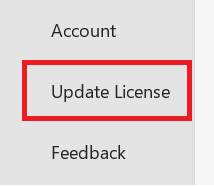
* Requires Outlook version 2402 or later
** Requires version 2401 or later
Please read Microsoft Copilot Chat– Frequently Asked Questions (Section C) for details.
When you subscribe to M365 Copilot (Premium), you are eligible for creating an agent using Copilot Studio (https://copilotstudio.microsoft.com)
To publish your agent for external facing/public use:
Publishing an agent for external or public use requires setting up a production environment and may consume resources such as Copilot Credits; therefore, charges may apply. For details, please contact ITSC Service Desk.
Previous Copilot Training about building your own agent:
[Training] Building Your First AI Agent with Copilot Studio: A Low‑Code Approach
Copilot Security and Privacy
- Microsoft Copilot Chat– Frequently Asked Questions (Section B) for details.
AI tools Security
For more frequently asked questions, please refer to this article:
All IT – Microsoft Copilot Chat– Frequently Asked Questions
For Microsoft Copilot Chat usage tips (CUHK Login Required):
All IT – Microsoft Copilot Chat Usage Tips
Training on M365 Copilot:
- Q4 2026 – Q1 2027 Microsoft Copilot and Cowork Training (staff login required)
- [Training] Learn & Work Smarter with AI – Microsoft Copilot Chat (Basic)
- [Training] Unlock AI‑Driven Productivity with M365 Copilot (Premium)
- [Training] Building Your First AI Agent with Copilot Studio: A Low‑Code Approach





© 2026 All Rights Reserved. The Chinese University of Hong Kong.